Evo-RL


SJTU & Evo-Tech
Architecture Overview
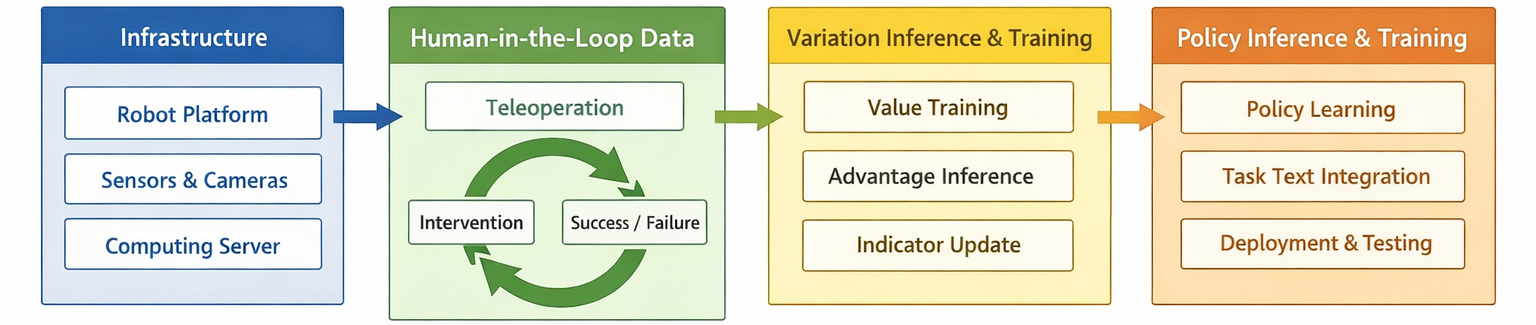
## 🎯 Evo-RL Focus
- **Open real-world RL on two platforms**: we build and release full real-world RL pipelines on SO101 and AgileX (PiPER/PiPER-X).
- **Open code, models, and datasets for reproducibility**: we continuously release runnable offline RL assets so more people can reproduce results and apply them to real-world tasks.
- **Open algorithm and community co-evolution**: we reproduce existing real-world RL methods, propose new methods, and keep publishing data/benchmarks to grow a collaborative open-source community.
## 🚀 News
- **[2026-06-30]** Added a detailed Hugging Face dataset card for the RW-RL Dataset, including visual examples, release statistics, file layout, modalities, and download instructions.
- **[2026-03-07]** Added AgileX (PiPER/PiPER-X) support for real-world RL.
- **[2026-02-26]** First SO101 real-world RL baseline and reproducible CLI workflow are released.
## 🧭 Table of Contents
| Getting Started | Training Pipeline | Project Info |
| -------------------------------------- | ---------------------------------------------------------------------------- | ------------------------------------------- |
| [⚡ Quick Start](#quick-start) | [4) Value Function Training](#value-function-training) | [Model & Dataset](#model--dataset) |
| [1) Installation](#installation) | [5) Value Inference](#value-inference) | [Community Channels](#community-channels) |
| [2) Hardware Setup](#hardware-setup) | [6) Policy Training](#policy-training) | [Affiliations](#affiliations) |
| [3) Data Collection](#data-collection) | [7) Closed-loop Rollout and Next Round](#closed-loop-rollout-and-next-round) | [Citation](#citation) / [License](#license) |
Value Visual Results
Success Case

Failure Case

Policy Rollout Visual Results


Human-in-the-Loop Visual Results


## ⚡ Quick Start
**LeRobot-aligned foundation:** we use LeRobot as the base of this codebase because its inference and data-collection logic are highly aligned with real-world RL workflows.
### 1) Installation
```bash
git clone https://github.com/MINT-SJTU/Evo-RL.git
cd Evo-RL
conda create -y -n evo-rl python=3.10
conda activate evo-rl
pip install -e .
```
For setup details and platform-specific dependencies, follow the official [LeRobot configuration guide](https://huggingface.co/docs/lerobot/installation).
### 2) Hardware Setup
#### SO Series (SO100/SO101)
For SO-series setup, please follow the [official tutorial](https://wiki.seeedstudio.com/cn/lerobot_so100m/) in detail and complete all installation and configuration steps there before continuing.
The examples below use **SO101** as the reference configuration.
#### Device path recommendation
Recommended path strategy:
- **Robot serial:** use `/dev/serial/by-id/` (stable across reboots).
- **Cameras:** prefer `/dev/v4l/by-id/`; if IDs are not unique, use `/dev/v4l/by-path/`.
- In examples below: robot ports use `by-id`, camera paths use `by-path`.
You can inspect available stable paths with:
```bash
ls -l /dev/serial/by-id/
ls -l /dev/v4l/by-id/
ls -l /dev/v4l/by-path/
```
For single-arm users, no major changes are required. After setup, run the command below to verify your system is ready for the next stage:
```bash
lerobot-teleoperate \
--robot.type=so101_follower \
--robot.port=/dev/serial/by-id/ \
--robot.id=my_so101_follower \
--teleop.type=so101_leader \
--teleop.port=/dev/serial/by-id/ \
--teleop.id=my_so101_leader
```
For dual-arm users, we recommend mirroring the mechanical parts corresponding to servos 4/5/6 on the left leader and left follower arms, which usually provides a more natural bimanual operation feel.
Before running the dual-arm command, make sure calibration files exist under `~/.cache/huggingface/lerobot/calibration/` like:
```text
calibration/
├── robots
│ └── so_follower
│ ├── bi_so101_follower_left.json
│ └── bi_so101_follower_right.json
└── teleoperators
└── so_leader
├── bi_so101_leader_left.json
└── bi_so101_leader_right.json
```
This layout is slightly different from single-arm setup.
Then run this command to verify dual-arm setup:
```bash
lerobot-teleoperate \
--robot.type=bi_so_follower \
--robot.left_arm_config.port=/dev/serial/by-id/ \
--robot.right_arm_config.port=/dev/serial/by-id/ \
--robot.id=bi_so101_follower \
--teleop.type=bi_so_leader \
--teleop.left_arm_config.port=/dev/serial/by-id/ \
--teleop.right_arm_config.port=/dev/serial/by-id/ \
--teleop.id=bi_so101_leader
```
#### Camera configuration
Before data collection, validate camera mapping first.
Check whether each camera supports your target setting (for example, `640x480 @ 30`):
```bash
v4l2-ctl -d /dev/v4l/by-path/ --list-formats-ext
```
Single-arm camera check (example):
```bash
lerobot-teleoperate \
--robot.type=so101_follower \
--robot.port=/dev/serial/by-id/ \
--robot.id=my_so101_follower \
--robot.cameras='{ front: {type: opencv, index_or_path: "/dev/v4l/by-path/", width: 640, height: 480, fps: 30}}' \
--teleop.type=so101_leader \
--teleop.port=/dev/serial/by-id/ \
--teleop.id=my_so101_leader \
--display_data=true
```
Dual-arm camera check (example):
```bash
lerobot-teleoperate \
--robot.type=bi_so_follower \
--robot.left_arm_config.port=/dev/serial/by-id/ \
--robot.right_arm_config.port=/dev/serial/by-id/ \
--robot.id=my_bi_so101_follower \
--robot.left_arm_config.cameras='{ wrist: {type: opencv, index_or_path: "/dev/v4l/by-path/", width: 640, height: 480, fps: 30}}' \
--robot.right_arm_config.cameras='{ wrist: {type: opencv, index_or_path: "/dev/v4l/by-path/", width: 640, height: 480, fps: 30}, front: {type: opencv, index_or_path: "/dev/v4l/by-path/", width: 640, height: 480, fps: 30}}' \
--teleop.type=bi_so_leader \
--teleop.left_arm_config.port=/dev/serial/by-id/ \
--teleop.right_arm_config.port=/dev/serial/by-id/ \
--teleop.id=my_bi_so101_leader \
--display_data=true
```
For dual-arm camera mapping, it is fine to attach `front` under either the left-arm or right-arm camera config. If you use more camera views, place them under either the left or right arm camera config as well.
If needed, you can also use temporary device paths (for example `/dev/ttyACM*` and `/dev/video*`) during initial debugging.
#### AgileX (PiPER/PiPER-X)
PiPER commands use the USB-CAN adapter's stable `ID_SERIAL_SHORT` instead of a temporary Linux
`canN` name. List the connected adapters with:
```bash
for device in /sys/class/net/*; do
[ "$(cat "$device/type" 2>/dev/null)" = "280" ] || continue
serial=$(udevadm info --query=property --path="$device" | sed -n 's/^ID_SERIAL_SHORT=//p')
echo "$(basename "$device"): $serial"
done
```
Then configure the adapters needed for the run:
```bash
lerobot-setup-can --mode=setup \
--usb_can_serials=,,,
```
For single-arm users, run the command below to verify the system is ready:
```bash
lerobot-teleoperate \
--robot.type=piperx_follower \
--robot.port= \
--robot.id=my_piperx_follower \
--teleop.type=piperx_leader \
--teleop.port= \
--teleop.id=my_piperx_leader
```
For bimanual users, run this command to verify dual-arm teleoperation:
```bash
lerobot-teleoperate \
--robot.type=bi_piperx_follower \
--robot.id=my_bi_piperx_follower \
--robot.left_arm_config.port= \
--robot.right_arm_config.port= \
--teleop.type=bi_piperx_leader \
--teleop.id=my_bi_piperx_leader \
--teleop.left_arm_config.port= \
--teleop.right_arm_config.port=
```
For PiPER (non-X), replace `bi_piperx_follower`/`bi_piperx_leader` with `bi_piper_follower`/`bi_piper_leader`.
### 3) Data Collection
Collect rollout data with `lerobot-human-inloop-record`.
#### SO Series (SO100/SO101)
Bimanual template:
```bash
lerobot-human-inloop-record \
--robot.type=bi_so_follower \
--robot.left_arm_config.port=/dev/serial/by-id/ \
--robot.right_arm_config.port=/dev/serial/by-id/ \
--robot.id=my_bi_so101_follower \
--robot.left_arm_config.cameras='{ wrist: {type: opencv, index_or_path: "/dev/v4l/by-path/", width: 640, height: 480, fps: 30, fourcc: "MJPG"}}' \
--robot.right_arm_config.cameras='{ wrist: {type: opencv, index_or_path: "/dev/v4l/by-path/", width: 640, height: 480, fps: 30, fourcc: "MJPG"}, front: {type: intelrealsense, serial_number_or_name: "", width: 640, height: 480, fps: 30, warmup_s: 2}}' \
--teleop.type=bi_so_leader \
--teleop.left_arm_config.port=/dev/serial/by-id/ \
--teleop.right_arm_config.port=/dev/serial/by-id/ \
--teleop.id=my_bi_so101_leader \
--dataset.repo_id=/ \
--dataset.single_task="" \
--dataset.num_episodes= \
--dataset.episode_time_s= \
--dataset.reset_time_s= \
--dataset.push_to_hub=true \
--display_data=true
```
Recommendation: use **`fourcc: "MJPG"`** for OpenCV and **`warmup_s`** for RealSense. In this example `front` uses RealSense, but you can switch it to OpenCV with the same structure.
#### AgileX (PiPER/PiPER-X)
Bimanual template (left/right, PiPER-X example):
```bash
lerobot-human-inloop-record \
--robot.type=bi_piperx_follower \
--robot.id=my_bi_piperx_follower \
--robot.left_arm_config.port= \
--robot.right_arm_config.port= \
--teleop.type=bi_piperx_leader \
--teleop.id=my_bi_piperx_leader \
--teleop.left_arm_config.port= \
--teleop.right_arm_config.port= \
--dataset.repo_id=/ \
--dataset.single_task="" \
--dataset.num_episodes= \
--dataset.episode_time_s= \
--dataset.reset_time_s= \
--dataset.push_to_hub=true \
--display_data=true
```
Hotkeys:
- `i`: toggle intervention mode (policy <-> teleop takeover)
- `s`: mark success and end current episode
- `f`: mark failure and end current episode
- `Right Arrow`: end the current loop early
- `Left Arrow`: end early and re-record the current episode
- `Esc`: stop the recording session
Quick quality check:
```bash
lerobot-dataset-report --dataset /
```
This prints: dataset meta, totals, episode-length stats/histogram, success/intervention metrics, task list, and full feature schema.
### 4) Value Function Training
Train the value function on the current dataset. Current default: [Pi\*0.6](https://www.pi.website/blog/pistar06) (`--value.type=pistar06`).
Single-GPU template:
```bash
lerobot-value-train \
--dataset.repo_id=/ \
--value.type=pistar06 \
--value.dtype=bfloat16 \
--value.push_to_hub=true \
--value.repo_id=/ \
--batch_size=64 \
--output_dir=outputs/value_train/ \
--job_name= \
--wandb.enable=true
```
Multi-GPU template:
```bash
CUDA_VISIBLE_DEVICES= accelerate launch \
--multi_gpu \
--num_processes= \
--mixed_precision=bf16 \
$(which lerobot-value-train) \
--batch_size=32/ \
```
To plug in a different value function, minimal path in this repo:
- Add `src/lerobot/values//configuration_.py` with `@PreTrainedConfig.register_subclass("")`.
- Add `src/lerobot/values//modeling_.py` with `Policy(PreTrainedPolicy)` (implement at least `forward`, `predict_value`, and `build_training_raw_batch_hook` for `lerobot-value-train`).
- Add `src/lerobot/values//processor_.py` with `make__pre_post_processors(...)`.
- Remove/replace the current `pistar06`-only type checks in `src/lerobot/configs/value_train.py` and `src/lerobot/scripts/lerobot_value_infer.py`.
### 5) Value Inference
Infer value signals and write value/advantage/indicator back to the dataset:
- `value`: estimated return-to-go of the current frame.
- `advantage`: relative improvement signal (higher means better-than-baseline trajectory quality).
- `indicator`: binarized training tag derived from advantage.
Single-GPU template:
```bash
lerobot-value-infer \
--dataset.repo_id=/ \
--inference.checkpoint_path=outputs/value_train/ \
--runtime.device=cuda \
--runtime.batch_size=64 \
--acp.enable=true \
--acp.n_step=50 \
--acp.positive_ratio=0.3 \
--acp.value_field=complementary_info.value_ \
--acp.advantage_field=complementary_info.advantage_ \
--acp.indicator_field=complementary_info.acp_indicator_ \
--output_dir=outputs/value_infer/ \
--job_name=.infer
```
Multi-GPU template:
```bash
CUDA_VISIBLE_DEVICES= accelerate launch \
--multi_gpu \
--num_processes= \
--mixed_precision=bf16 \
$(which lerobot-value-infer) \
```
Parameter notes:
```bash
--acp.n_step: n-step advantage horizon.
--acp.positive_ratio: positive label ratio after advantage binarization (e.g., 0.3 = top 30% per task).
```
Expected new columns:
```bash
complementary_info.value_
complementary_info.advantage_
complementary_info.acp_indicator_
```
These columns are written back to the original dataset specified by `--dataset.repo_id`.
### 6) Policy Training
Train the policy with advantage-conditioned tags.
**Policy requirement:** it must support **text/task input**, because Advantage-Conditioned tags are injected into **task text**.
Single-GPU template:
```bash
lerobot-train \
--dataset.repo_id=/ \
--policy.type= \
--policy.pretrained_path= \
--policy.device=cuda \
--policy.dtype=bfloat16 \
--batch_size=32 \
--steps=30000 \
--acp.enable=true \
--acp.indicator_field=complementary_info.acp_indicator_ \
--acp.indicator_dropout_prob=0.3 \
--output_dir=outputs/train/ \
--job_name= \
--wandb.enable=true \
--policy.push_to_hub=true \
--policy.repo_id=/
```
`--acp.indicator_dropout_prob` controls tag drop rate in task text; `0.3` helps learn both tagged and untagged conditions.
Important checks:
- `--acp.indicator_field` must exist in the dataset and be **binary (`0/1`)**.
Multi-GPU template:
```bash
CUDA_VISIBLE_DEVICES= accelerate launch \
--multi_gpu \
--num_processes= \
--mixed_precision=bf16 \
$(which lerobot-train) \
--batch_size=32/ \
```
### 7) Closed-loop Rollout and Next Round
Deploy the trained policy in human-in-loop mode and collect the next dataset round:
```bash
lerobot-human-inloop-record \
--robot.type=bi_so_follower \
--robot.left_arm_config.port=/dev/serial/by-id/ \
--robot.right_arm_config.port=/dev/serial/by-id/ \
--robot.id=my_bi_so101_follower \
--robot.left_arm_config.cameras='{ wrist: {type: opencv, index_or_path: "/dev/v4l/by-path/", width: 640, height: 480, fps: 30, fourcc: "MJPG"}}' \
--robot.right_arm_config.cameras='{ wrist: {type: opencv, index_or_path: "/dev/v4l/by-path/", width: 640, height: 480, fps: 30, fourcc: "MJPG"}, front: {type: intelrealsense, serial_number_or_name: "", width: 640, height: 480, fps: 30, warmup_s: 2}}' \
--teleop.type=bi_so_leader \
--teleop.left_arm_config.port=/dev/serial/by-id/ \
--teleop.right_arm_config.port=/dev/serial/by-id/ \
--teleop.id=my_bi_so101_leader \
--dataset.repo_id=/ \
--dataset.single_task="" \
--dataset.num_episodes= \
--dataset.episode_time_s= \
--dataset.reset_time_s= \
--dataset.push_to_hub=true \
--display_data=true \
--policy.path= \
--resume=true
```
Dataset continuation options:
- **Append in place:** keep `--resume=true` and continue recording into the same dataset.
- **Merge multiple rounds:** use the official dataset editor to merge separate datasets.
```bash
lerobot-edit-dataset \
--repo_id=/ \
--operation.type=merge \
--operation.repo_ids="['/','/']"
```
Additional data attributes vs default `lerobot-record` behavior:
- `complementary_info.policy_action`: policy output action at each step.
- `complementary_info.is_intervention`: whether current step is in intervention.
- `complementary_info.state`: intervention state-machine state.
- `complementary_info.collector_policy_id`: step-level action source ID (`human` or policy ID).
- Episode metadata `episode_success`: success/failure label saved per episode.
Iterative training loop (abstract):
```text
[Multi-task demonstration data pool]
|
v
[Offline RL pretraining for a vision-language-action policy]
|
v
[Task-specific initialization / fine-tuning from demonstrations]
|
v
|---- Iteration k = 1..K -------------------------------------|
| 1) Deploy current policy π_k and collect new rollout data |
| 2) Merge into data pool: D <- D U new_data |
| 3) Train value function on D |
| 4) Infer advantage and binarize into indicator tags |
| 5) Train advantage-conditioned policy to get π_{k+1} |
|-------------------------------------------------------------|
|
v
[Stronger policy with improved success rate and throughput]
```
## Model & Dataset
- Hugging Face model release: coming soon
- Hugging Face dataset: [MINT-SJTU/RW-RL-Dataset](https://huggingface.co/datasets/MINT-SJTU/RW-RL-Dataset)
**RW-RL Dataset** is the companion real-world reinforcement learning dataset for Evo-RL. It is organized around iterative policy improvement on real robots, including teleoperation demonstrations, human-in-the-loop intervention data, policy rollout traces, episode-level success/failure labels, intervention states, and complementary signals used for value/reward modeling.
The dataset is designed to support offline RL, value learning, advantage-conditioned policy training, and closed-loop rollout analysis across real robot tasks. Please refer to the Hugging Face dataset card for release notes, schema details, splits, and version tags.
## Community Channels
- WeChat official post: [Coming Soon](https://evorl.example.com/wechat-post)
- Documentation: [`docs/README.md`](./docs/README.md)
- GitHub Issues: [Create an issue](https://github.com/MINT-SJTU/Evo-RL/issues)
- Email: business@evomind-tech.com
- Get into WeChat group by scanning QR code:
-->
- Get into WeChat Group or get So101 Supplier, please contact the following WeChat, 加群(注明加真机强化学习群)/So101 设备提供商:

## Affiliations


## Citation
```bibtex
@misc{ye2026evorl,
title = {Evo-RL: Iterative Robot Reinforcement Learning from Selective Experience},
author = {Kai Ye and Yifan Jin and Qianhang Luo and Hongru Zhang and Jiedong Zhang and Shuyuan Hu and Song-Yuan Wu and Jihai Xu and Jie Zhao and Bo Zhao},
year = {2026},
eprint = {2610.13345},
archivePrefix = {arXiv},
primaryClass = {cs.RO},
url = {https://arxiv.org/abs/2610.13345}
}
```
## License
Apache-2.0. See [LICENSE](./LICENSE).
## Star History
[](https://www.star-history.com/?repos=MINT-SJTU%2FEvo-RL&type=date&legend=top-left)